
EDIT LAB
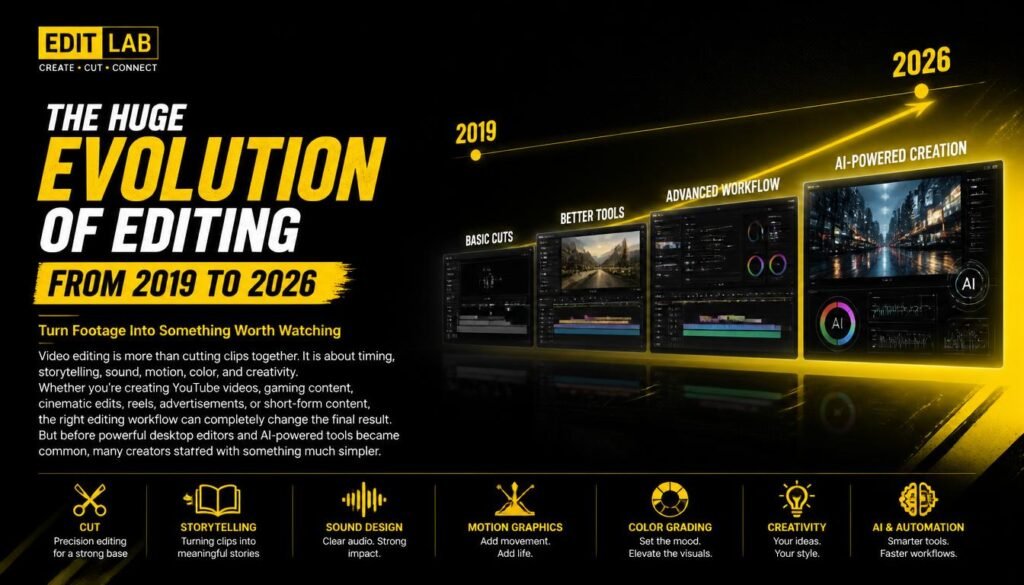
THE HUGE EVOLUTION OF EDITING FROM 2019 TO 2026
Turn Footage Into Something Worth Watching
Video editing is more than cutting clips together. It is about timing, storytelling, sound, motion, color, and creativity.
Whether you’re creating YouTube videos, gaming content, cinematic edits, reels, advertisements, or short-form content, the right editing workflow can completely change the final result.
But before powerful desktop editors and AI-powered tools became common, many creators started with something much simpler.
📱 Where It All Started — Old KineMaster
For many mobile creators, KineMaster was one of the first steps into video editing.
Before complicated desktop timelines and advanced visual-effects software became part of the workflow, KineMaster made editing feel possible right from a phone.
The older versions had a much simpler and more straightforward experience. You could import your clips, place them on a t
imeline, trim footage, add music, text, transitions, and effects — all from a mobile device.
For beginners, that was a big deal.
You didn’t need a powerful PC or expensive software to start learning the basics of editing. You just needed a phone, some footage, and an idea.
🎬 The Early Editing Experience
Old KineMaster introduced many beginners to fundamental editing concepts such as:
- Cutting and trimming clips
- Layer-based editing
- Adding music and sound effects
- Text and title animations
- Basic transitions
- Speed adjustments
- Chroma key
- Simple visual effects
- Voice recording
- Timeline-based editing
It wasn’t about having hundreds of effects.
It was about learning how a timeline works and how different pieces of footage come together to create a video.
❤️ The Beginning For Many Creators
For a lot of young creators, KineMaster wasn’t just another editing app.
It was where they made their first gaming montage, their first YouTube intro, their first AMV, their first meme edit, or even their first serious attempt at creating content.
The quality might not have been perfect.
The transitions might have been a little too much.
The music might have been louder than the voice.
But that’s part of the journey.
Every professional editor was once a beginner pressing their first cut.
🔄 From Kine
Master to Modern Editing
As creators became more experienced, many eventually moved toward more advanced software.
The journey often looked something like:
KineMaster → CapCut → Premiere Pro → After Effects → DaVinci Resolve
Of course, there is no required path. Every editor learns differently.
But the fundamentals remain the same:
Cut. Time. Sound. Motion. Color. Story.
The software changes.
The creativity doesn’t.
THE HUGE EVOLUTION OF EDITING FROM 2019 TO 2026
🎬 The Tools Behind Great Edits
Adobe After Effects
After Effects is built for motion graphics, visual effects, animations, transitions, cinematic effects, and compositing.
It is especially powerful when you want to take ordinary footage and transform it into something visually unique.
Perfect for:
- Motion graphics
- Text animations
- Visual effects
- Cinematic effects
- Advanced transitions
- Logo animations
- Compositing
DaVinci Resolve
DaVinci Resolve combines professional video editing, color grading, visual effects, and audio production in one powerful application.
One of its biggest strengths is color grading. Even a simple edit can look dramatically better with proper color correction and grading.
Perfect for:
- Professional video editing
- Color grading
- Cinematic videos
- YouTube content
- Audio editing
- Film-style workflows
CapCut
CapCut has become one of the easiest ways to create fast and engaging content.Its simple interface makes it useful for beginners, while features such as keyframes, effects, captions, speed controls, transitions, and AI-powered tools allow creators to produce impressive edits quickly.
Perfect for:
-

YouTube Shorts
- Reels
- Gaming clips
- Fast social-media edits
- Beginner-friendly editing
⚡ The Editing Process
Great editing usually starts long before the first effect is added.
01 — Organize
Bring your footage, music, sound effects, graphics, and other assets together.
02 — Cut
Remove unnecessary footage and build the basic structure of your video.
03 — Add Motion
Use keyframes, zooms, transitions, animations, and effects to make important moments stand out.
04 — Sound
Good audio can make an average video feel professional. Add music, sound effects, ambience, and clean dialogue where needed.
05 — Color
Correct exposure and colors first. Then create a consistent visual style with color grading.
06 — Polish
Add titles, subtitles, graphics, effects, and final adjustments before exporting.
THE HUGE EVOLUTION OF EDITING FROM 2019 TO 2026
🎮 Editing Gaming Videos
Gaming content doesn’t have to be just raw gameplay.
Smart editing can turn hours of gameplay into an entertaining story.
Use:
- Fast cuts during intense moments
- Zooms for funny reactions
- Sound effects for important actions
- Subtitles for dialogue
- Music to control the mood
- Memes and visual effects when appropriate
- Smooth transitions between scenes
The goal isn’t to add an effect every second.
The goal is to keep the viewer watching.
🎨 Effects Are Not the Whole Edit
One of the biggest mistakes beginners make is using too many effects.
A good edit doesn’t need hundreds of transitions.
Sometimes a simple cut, a well-timed zoom, and the right sound effect can be more powerful than a complicated visual effect.
Editing is about timing, not showing off every effect you know.
THE HUGE EVOLUTION OF EDITING FROM 2019 TO 2026
🚀 From Beginner to Editor
You don’t need expensive equipment or years of experience to start.
Pick one editing program, learn the fundamentals, and practice consistently.
Start with:
Cutting → Keyframes → Audio → Color → Motion → Effects → Storytelling
Once these fundamentals become natural, learning advanced techniques becomes much easier.
THE HUGE EVOLUTION OF EDITING FROM 2019 TO 2026
🔥 Final Cut
THE HUGE EVOLUTION OF EDITING FROM 2019 TO 2026
Every editor develops their own style.
Some prefer clean and minimal edits. Others love cinematic color, aggressive transitions, motion graphics, or fast-paced gaming edits.
There is no single “perfect” editing style.
Learn the tools. Understand the fundamentals. Experiment with your own ideas.
Then create something people want to watch.
EDIT. CREATE. REPEAT.
https://www.blackmagicdesign.com/in/products/davinciresolve